Project Onboarding
Last updated: July 1, 2026
A step-by-step guide to help you access, review, and accept your offer — including steps for payments and document signing.
Getting Started
Once you are selected for a project, you will receive an e-mail containing on how to proceed with your onboarding. The onboarding process basically consists of:
Reviewing and signing Turing Terms of Service
Completing ID verification
Adding Tax and Payment information
Agreement signature
Depending on the project, the onboarding process might occur through either Turing’s platform or Deel Platform (external provider).
Please ensure that all steps are completed before your start date to avoid delays in your onboarding.
Onboarding Process at Turing’s platform
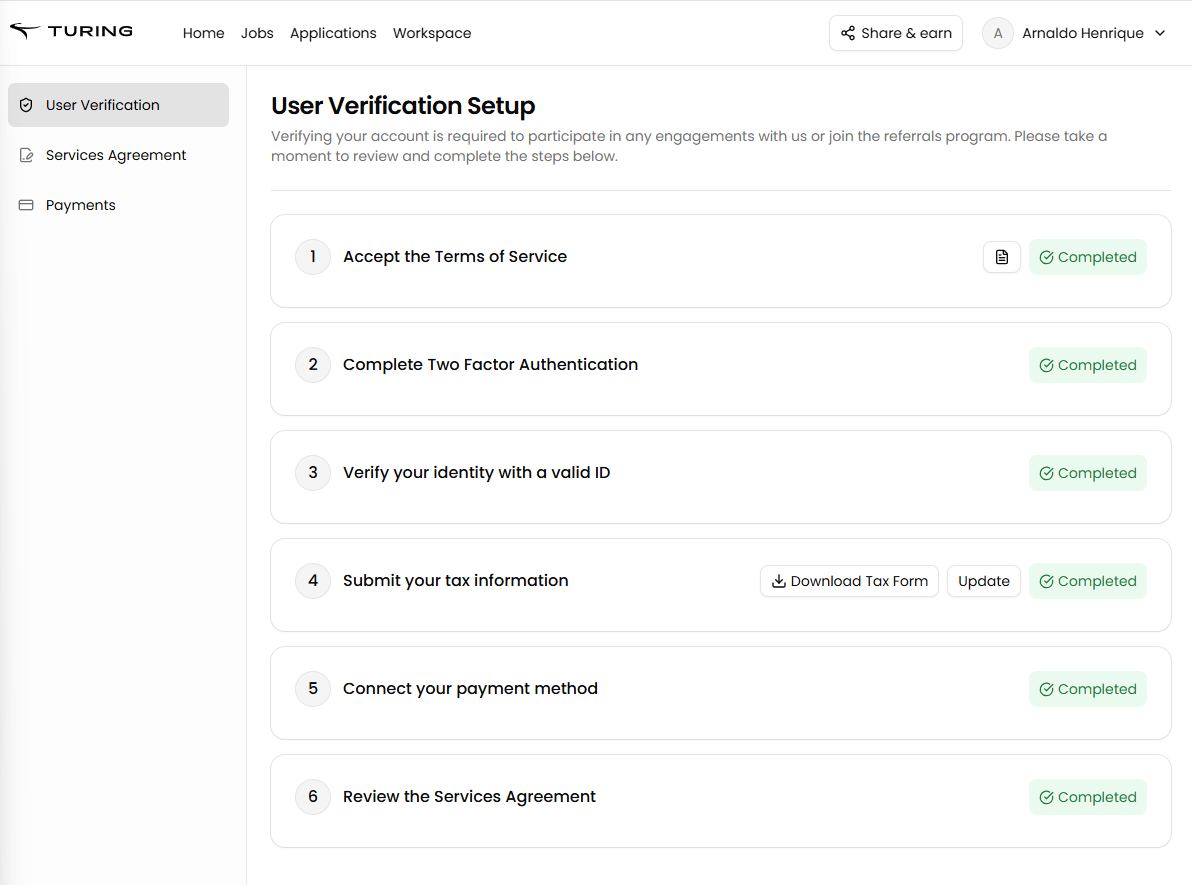
1. Log in at your account after you receive the invitation email
2. Go to the Workspace.
a. Review and Sign the Terms of Service.
b. Set up the 2FA
c. Complete ID validation.
Accepted Documents: Only a driver's license or passport are accepted for ID verification. Digital versions of national ID documents are not accepted.
Troubleshooting ID Verification: If your ID verification fails, try these steps:
Use a desktop browser (not mobile) in an incognito/private window
Disable any VPN/proxy and ad‑blocking/extension tools
Check browser permissions to allow camera access
Clean the camera lens and ensure bright, even lighting while avoiding glare and shadows
Capture the ID flat and fully in‑frame, avoid fingers covering edges, and ensure the name and date of birth match your profile
If the system pre-fills your ID number field with incorrect information (such as a serial number instead of your actual ID number), contact support for a wallet reset. The automated system may misread documents and populate locked fields with wrong data that you cannot edit directly.
Note for Nigerian applicants: The following IDs are accepted for verification: international passport (must be valid) and driver's license card. Digital NIN (digital NIN slips or soft copies of documents) cannot be approved. No alternative verification methods are available if you don't have one of these accepted forms of ID.
After repeated failed attempts, verification automatically moves to manual review for quality assurance purposes. However, manual verification is not offered as an alternative verification method. Extensions to complete verification with alternative documents are not available. If you do not currently have an eligible document (driver's license or passport), you must obtain one and then reapply to continue the verification process.Important: Once manual verification is completed and a final rejection is issued, the decision is final and cannot be reversed or manually reviewed. There is no process to request a review or reset after a final rejection.
If you need to contact support about ID verification, provide: your device and browser (including version), any error message or where the flow stops, the country and type of ID (passport, driver’s license, etc.), and the timestamp of your latest attempt.
d. Fill out your tax form (choose the correct one based on your residency): W-9 for U.S. residents or W-8BEN for non-U.S. residents
e. Set up your payment information.
f. Review and Sign your Scope of Work (SOW)
Onboarding Process at Deel
1. Accept the Deel invitation sent to your email.
2. Fill out your tax form (W-9 or W-8BEN).
3. Complete ID validation.
4. Sign the agreement and any additional documents required.
5. Upload any regional documents if requested by Deel.
After Completing the Process
Once these steps are completed (at Turing or Deel), the Onboarding team will create your credentials (system accesses) and send it to your personal email within 24 hours before your start date.
For talents transitioning from other platforms: If you previously onboarded through Deel or another platform and are now transitioning to Turing's platform, you must complete verification at https://work.turing.com/dashboard/user-verification before payments can be processed. Incomplete verification will block payment processing.
📩 Please check your spam and “Updates” folders if you don’t see the email. All onboarding communications are sent from no-reply@turing.com
How does the payment work?
Your payout timing depends on a few factors:
When you log your hours: Payments are scheduled based on when your hours are submitted for each pay period.
Processing time: Regular salary and hours worked are processed and paid on the 5th calendar day of each month (Processing may take 2 to 3 calendar days after payment) . If you have an applicable notice period, it is processed separately and paid on the 10th calendar day of each month — no action is required from you as this is handled automatically.
Account setup: Make sure your payment method is correctly configured with our payment processors to avoid delays.
If your payment setup shows “Processing” status: After submitting your payment information, you may see a “Processing” status indicating “Your payment profile requires additional validations.” This is expected behavior and typically completes within 48 hours.
Important: Do not modify your profile details or tax information while validation is processing — making changes during this period can cause delays in your onboarding. The payment step will update automatically once validation completes.
If the processing status does not change after 48 hours, contact support with: (1) the email address on your Turing account, (2) a screenshot of the current status, and (3) a brief description of any name or bank detail mismatches for investigation.
For talents transitioning from other platforms: If you previously onboarded through Deel or another platform and are now transitioning to Turing's platform, you must complete verification at https://work.turing.com/dashboard/user-verification before payments can be processed. Incomplete verification will block payment processing.
Need Help with payment?
If, after being selected for a project, you need assistance setting up your payment information, please login at the logged enviroment at help.turing.com with your Turing email or reach out to us at work.turing.com